Things are coming together now..
We have an opensource replacement for the now apparently-now-unsupported (as predicted) commercial ambilight hardware/software.
And a robust and open hardware platform, here's one example out of many.
Some of you who own Philips Ambilight systems like myself may have experienced 'led death' in the main washer.. this results in flashing/flickering, whole color going out, etc. My solution was to unplug all three defective LED arrays, they really aren't worth fixing. Then I insulated the pcb to prevent shorts, and it only serves as a controller for the side lights. The ambx system was an really an entry level product that may have been a bit before it's time. It suffered in sales due to lack of market, extremely poor quality components, overcomplicated PCB design, driver issues, unnecessary tacked on gimmicks (fans + rumble), lack of support, and lack of developer interest among other things.
But RGB lighting is now here to stay, that's for sure. Hopefully Philips will try again, or another manufacturer will set a higher standard. Until then, a handful of hardware hackers, students and coders will continue making their own systems and taking innovative lighting in a new direction.
See Also:
http://brunql.github.com/ambilight/
http://saikoled.com (note, sign out of google to download design docs)
http://hardware.slashdot.org/story/10/11/19/1825242/Arduino-Based-High-Powered-LED-Lighting-Over-Wi-Fi?from=rss
http://qdot.github.com/libambx/ and http://www.nonpolynomial.com/
Edit:
Now [royboy] has done a full implementation with Wiring/Processing on an arduino platform.
Now I wish my DealExtreme order with the RGB strips would finally ship.. it's only been a month!
Edit II
Yet another (I'm not complaining, quite the opposite!):
Christian Pigeon's system, based on Amblone.
Showing posts with label ambx. Show all posts
Showing posts with label ambx. Show all posts
Tuesday, November 30, 2010

Monday, May 18, 2009
AmbX Peripheral Fake Out - Part II
Ok, here is the final, 100% correct pinout. Now start connecting weird things to your AmbX without fear of explosion or death!
Notes:
Notes:
- These were pinned and drawn from actual Fan and Rumbler accessories.
- The left diagram is the Rumbler, the right diagram is either of the fan jacks. The polarity on those motors is not very important but provided nonetheless. (there is a small red dot on the motor)
- There is no resistor for the jumper. I used one when I was messing about because its safer than just shorting unknown things out. But now we know there isn't one for sure.
- Too bad both jacks make use of pins that aren't on S-video cables. Otherwise I'd just knock out the plastic insert and use one of those. You could use it on the Fan one if you provided your own external power supply I suppose.
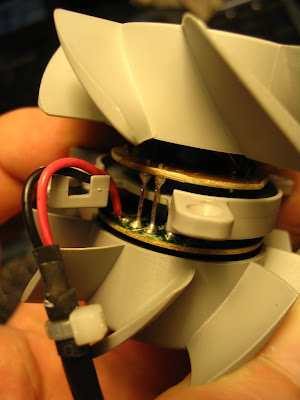
- The Rumbler (can we call it something else?) has 2 zones, Right and Left. But on the one I took apart, you'll notice someone put glue between their joint, defeating the whole purpose of the rubber standoffs that isolate the two zones from themselves and the base. Besides that, its effectiveness is questionable.. a friend said "Who plays FPS's with the keyboard (alone) anymore?".. Good point, unless you are playing DOOM or something where both hands are on the keyboard, the right side rumbler is mostly useless. Exxxxtreme numpad plugin for Excel coming soon! Feel those numbers and formulas come to life! (I admit, I love the numpad and can't live without it. I'd sacrifice the speakers on my MBP to have a numpad.)
 |
| From AmbX Disassembly |
  |
| Click for more pics |
Sunday, May 17, 2009
AmbX Peripheral Fake Out
Edit: If you just want the pinout, skip ahead to part 2.
Had a few minutes tonight to use a classic technique of sticking safety pins (not safe!) into those rear jacks and seeing if anyone's home and how they respond to threats. Found an interesting 3.3v which I immediately thought was a floating input sense. Turns out when you ground that (pull down via a 1k resistor), you've got some extra fan's and a rumble pad! Here's a rough diagram from what I could see with an old Simpson 260 meter (easier to see PWM on old analog meter, although you can't read the pulse width.. scope is broke at the moment) I have not verified these by connecting actual motors yet, just the meter. I would wager the diagram is mostly correct, especially the fans.. they are very simple. The 'Direct Control' software will detect your fans and rumble in realtime when you put the resistor in the back. (I just stuck mine in the back socket pins, maxin relaxin.) If you can't find that app, look under Philips Accessories.. it doesn't live with the rest of the suite.
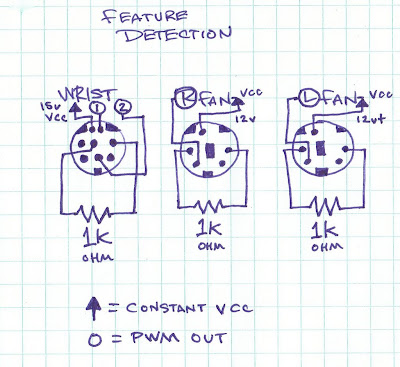
Erm, that 'OUT' is electron flow, not conventional. I could have wrote PWM return but whatevs. The point is: the VCC is constant, the PWM signal is ground. :)
Had a few minutes tonight to use a classic technique of sticking safety pins (not safe!) into those rear jacks and seeing if anyone's home and how they respond to threats. Found an interesting 3.3v which I immediately thought was a floating input sense. Turns out when you ground that (pull down via a 1k resistor), you've got some extra fan's and a rumble pad! Here's a rough diagram from what I could see with an old Simpson 260 meter (easier to see PWM on old analog meter, although you can't read the pulse width.. scope is broke at the moment) I have not verified these by connecting actual motors yet, just the meter. I would wager the diagram is mostly correct, especially the fans.. they are very simple. The 'Direct Control' software will detect your fans and rumble in realtime when you put the resistor in the back. (I just stuck mine in the back socket pins, maxin relaxin.) If you can't find that app, look under Philips Accessories.. it doesn't live with the rest of the suite.
Erm, that 'OUT' is electron flow, not conventional. I could have wrote PWM return but whatevs. The point is: the VCC is constant, the PWM signal is ground. :)
Tuesday, April 28, 2009
Ambx notes and plans
Mostly some links here for ideas on alternative transducers.
- http://www.makezine.com/images/02/DIY_home.pdf
- http://www.diy-home-theater-design.com/tactile-transducers.html
- http://www.baudline.com/erik/bass/tactile_faq.html
This is funny, "The light bulbs in my house are constantly burning out. This didn't happen before I installed my tactile array. What can I do?"
Plans:
- Look at the API and what it offers, although with all the driver problems this might be a waste of time. Ideally we'd want to make our own drivers, possibly even our own replacement hardware. (qDot already has a similar system already built)
- Look into how the game provides hooks into the drivers and make a sample app that acts like a real ambx and outputs what the game is expecting. (Which light, what color, intensity, saturation, rumble (on/off/or intensity), fan speed, etc) This will give a lot of insight into how much effort game developers are putting into actually supporting this hardware. (If I had to guess, very few man hours)
- Emulate the device entirely in software, mostly done by first part of 2nd bullet.
- Support MAX/MSP, Wiring libs, for DIY artists etc.
- (long term) Eliminate the commercial platform altogether, for non-gamer croud mostly. on your own hardware. Somehow, the freetrack guys got away with this, I don't know the legalites. http://www.free-track.net/english/ (since if the commercial platform fails, so does everything else.) DIY, open source hardware for everyone. Possibly make wrapper to allow homebrew hardware to use old AmbX game features
Thats all for now. Time to bring this thing down stairs onto the bench and spend an hour trying to get the !@# drivers to work so I can make some pinouts.
PS, for those having problems with the drivers, visit the ambx forums. You'll find lots of people just like you and just as pissed off. If they JUST released the separate components as EXE files, we'd be a lot better off. The updater thing seems to jack everything up.
Here is a dump of what the updater did for me, just now. Replace .dat with .exe and you can get the file. The dat contains xml that is a description of what 'it' is.
http://www.ambx.com/updates/update.xml < look inside of here for the exe urls for latest stuff
http://www.ambx.com/updates/NativeSoftwareInformation.xml < no idea, updater requested it but got 404
contents of update 4/28/09:
- http://www.ambx.com/updates/amBXIlluminate_V_1_0_2_ENU.exe
- http://www.ambx.com/updates/amBXControlPanel_V_1_1_2_ENU.exe
- http://www.ambx.com/updates/amBXEffects_V_1_1_2_ENU.exe
- http://www.ambx.com/updates/amBX_GamingFXGen_Setup_3.5.5.exe
- http://www.ambx.com/updates/amBX_AudioFXGen_Setup_3.1.1.exe
- http://www.ambx.com/updates/amBX_System_Setup_v1.1.3.2_Retail_2009-03-09.exe
Update status (ie what version you have) is stored in:
HKEY_LOCAL_MACHINE\SOFTWARE\amBX\Updater\InstalledPackages
If you delete the GUID's in there, the updater will at least get them again and reinstall them for you. But try to install the things manually, it seems to work better. If you are fast, you can catch what the updater downloaded in your TEMP directory, but i just gave you all the urls, so downloading them shouldn't be too hard. :) Remember for the latest drivers, peep on that update.xml
Wednesday, April 22, 2009

Monday, April 20, 2009
AmbX Uncasing

Inside the AmbX starter kit. Includes 2 satellite units and main wall washer. The insides are not too spectacular, although the board seems nicely made and isn't version nerfed. All capabilities of this washer control unit are present in the much more expensive kit that includes the sound system, silly fans and rumble keyboard wrest. I have my own audio system shared with my home theater so I wasn't interested in the speakers. If you opt for that system, the contents are 2 sat speakers for left and right which have RGB light domes on them, 1 subwoofer unit, 2 fans for left and right, and the same wall washer unit pictured here.
 Inside of the unit, it appears there is great possibility for modification. The controller appears to be an 8051 MCU with integrated USB host. (datasheet) Also note the populated JTAG port!
 I picked up this kit for around 50 dollars. The larger kit was just not interesting to me. First of all, the fans are just that, fans. (I took one apart in an evauation unit) The rumble pad is just a complete joke, it's either a hard block that's higher than your keyboard and uncomfortable or it's an earthquake/noise machine. I tested the full unit with Farcry2, an AmbX enhanced game and wasn't too impressed. I figure if I want the fans enough, I'll just make some, the pinout is straightforward into a PS2 looking connector. The fans blew when you sprinted in the game, or in my opinion, made up for the game sucking as much as it did. As I mentioned, the board does not look gimped or unpopulated in any way that would prevent anyone from hooking anything up to the extra outputs that are unused, including homemade fans. Rumble outputs with real home theater chair transducers anyone?
The software is the bad news, generally the drivers stink. I use Vista64 at work and I don't know if it was the driver version or what, but the AmbX driver/host application was using a whole core of a Core2Duo to flash its little lights while playing FarCry2. (Note these were OLD drivers) I haven't tested it too much here at home since I just got it, where I use Vista32. The first thing I did was dissect it. But the application and drivers are half baked for sure, after about a day of working with them. An app which was supposed to randomly cycle through mood settings as you used the computer conveniently disappeared after an update, and manually invoking (its exe) it hasn't work since I got it set up. (Although it did work on my eval at work) Even worse, Philips doesn't seem to want to have anything to do with this AmbX spinoff of its very nice AmbiLight tech. They sold the AmbX division to some VC company, where I bet it will be ground into soggy marketing mush to get as many units out the door before the whole thing folds. But here's where our communities prosper… The reason I bought this junk was because I believe in this technology, in its immersion qualities, and it has undeniable aesthetic effect for many settings. I have no hope for better drivers, much more game support, etc. But if it can average colors from desired quadants of the final framebuffer rendering a game, it should work in any instance. Its devices and GPIO can be made to do anything. It's drivers can be RE'd and proper ones made for general use or specific applications. I should mention with stock drivers, it does seem to function OK with Windows Media Center, so theoretically if you could not afford a nice Philips with AmbiLight, you can emulate it with this.
Following are some galleries of the software and disassembly, with pics of main chips. Have fun.
UPDATE: The CPU usage problems have been fixed with later driver revisions, but the software is still rather shoddy. The pics of the SW below are from the latest version. 64 bit drivers exist too, in case you were wondering. Also fixed mispelling of Philips, now they can have it easier when the subpoena comes claiming DMCA abuse. :)
 |
| Screen Captures |
 |
| AmbX Disassembly |
Subscribe to:
Posts (Atom)